SHIRT BAZAAR // PROMPT GUIDE & TEMPLATES
Prompt guide & templates for perfect generation.
Explore production-ready prompt templates and screenprint recipes tailored for 1-of-1 apparel. Switch between flat-lay garments and raw artwork, then make a print directly in the studio.
0 / week
Free Quota
0 Ratios
Canvas Shapes
0 Tiers
Render Fidelity
300 DPI VECTOR RESOLUTION100% COMBED COTTONCLEAN_BACKDROP ALPHA ISOLATIONVERBATIM QUOTED TYPOGRAPHYZERO MARGIN BLEED3-COLOR RISOGRAPH DOTSWATER-BASED SCREENPRINT INKCHEST PLACEMENT MARGINSSWISS BRUTALIST ELEVATIONS
Prompt Template Showcase(6 Production Renders)

STREETWEAR TEE
Illustrated Screenprint1024×1024
Signal Lost / Thunder Wolf
Wolf atop satellite dish with electric static and "SIGNAL LOST" fiery screenprint lettering.
CHEST EMBROIDERY / DTG
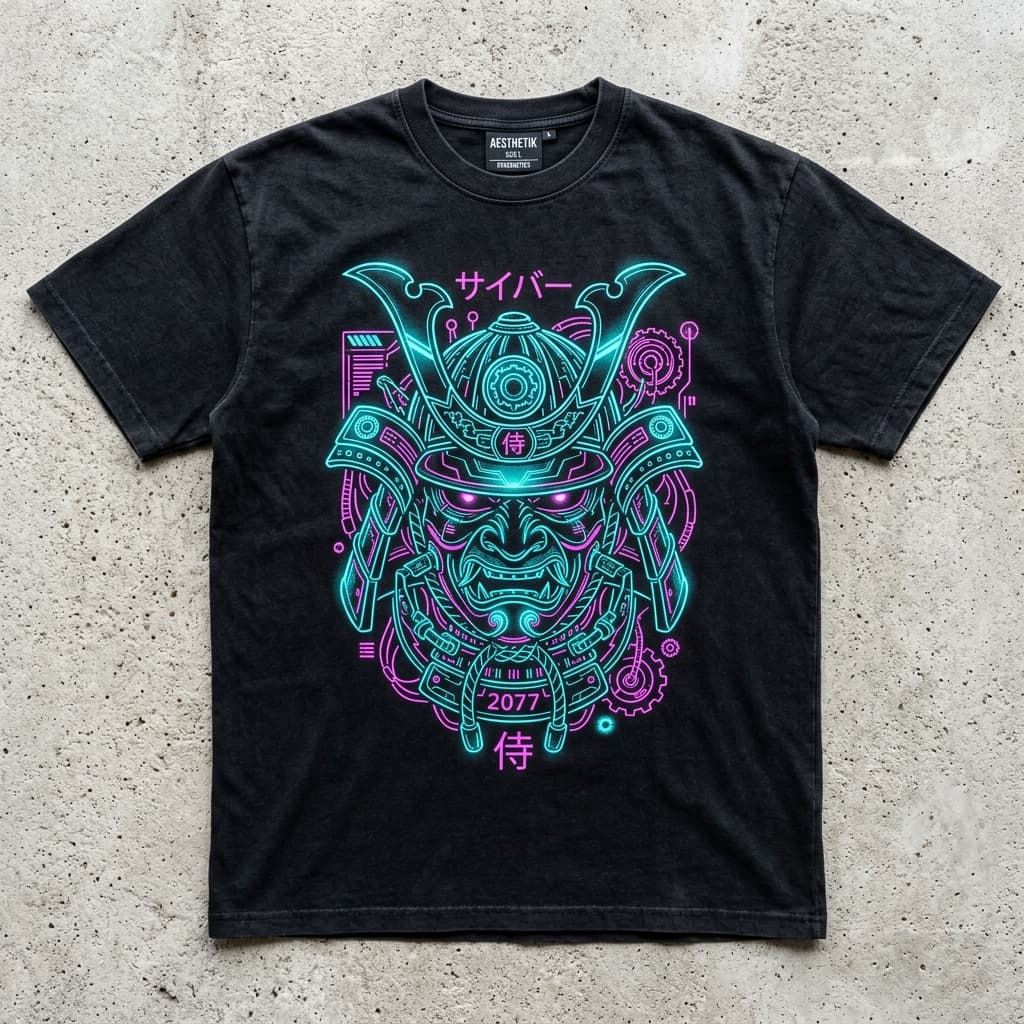
Cyberpunk Linework1024×1024
2077 Samurai Kabuto Mask
Cybernetic kabuto with glowing cyan circuits and "2077 SAMURAI" chest linework.

RAW CREAM COTTON
3-Color Risograph1024×1024
Mecha Warrior Shogun
Retro Japanese anime mecha with bold red sun and "MECHA WARRIOR SHOGUN" kanji headers.

OVERSIZED BOXY TEE
Swiss Poster Print1024×1024
Architektur Brutalist Blueprint
Monolithic concrete architectural elevation with "ARCHITEKTUR" Swiss typography grid.

CHROMATIC STAMP
Distressed Screenprint1024×1024
Hyper Drive / Chromatic Stencil
Futuristic distressed stencil lettering "HYPER DRIVE" with neon cyan and orange drop shadow.

3-COLOR COMIC TEE
Risograph Halftone1024×1024
Astro-Mech Saga Comic Panel
Retro sci-fi narrative panels with cobalt blue and fluorescent pink halftone grain.
02 // Prompt Architecture
The 5-slot prompt spine.
GPT Image rewards structure. Scene, Subject, Important details, Use case, Constraints, in that order, each heading on its own line. These are the same five headings the studio sends, so what you write here is what the model reads. Slot 5 is where unconstrained prompts fail silently, by letting the model invent a background you then have to print.
Interactive 5-Slot Stager & Slop Filter
Engineered according to the fal.ai GPT Image 2 spineLoad Template:
Compiled Production Prompt
Scene:
A standalone graphic on a 1:1 square canvas with a fully transparent background.

Subject:
Roaring timber wolf surrounded by electric static coils.

Important details:
3-color screenprint (cadmium red, pitch black, bone cream), heavy halftone dot grain, 0.5pt vector contours, distressed vintage crackle finish.

Use case:
Chest center graphic for heavyweight streetwear tee.

Constraints:
Pure transparent background, zero rectangular bounding box, no watermarks, no extra text.
Prompt Clean: 100% Visual FactsRule 1 & Rule 2 Check
Zero vague praise tokens detected. Every slot contains measurable physical constraints that the diffusion model can draw cleanly.
Linebreaks between sections guide attention layers cleanly without prompt token congestion.
The Five Slots, One At A Timelib/generation/prompt.ts
STEP 01
Scene
Where the artwork lives. For a shirt graphic that is the canvas itself: a transparent field at your chosen ratio, plus only the environment that belongs inside the art. No room, no floor, no sky.
Rule: The studio writes this slot for you. Add to it only when the setting is part of the drawing.
STEP 02
Subject
The hero and what it is doing. Form, pose, action, materials, expression. One focal thing, then at most three motifs that support it without crowding the silhouette.
Rule: Open with the hero and its action. Everything after this slot decorates that sentence.
STEP 03
Important details
Technique, named inks, outline weight, composition and lettering. Cadmium red and bone cream, 0.5pt contours, coarse halftone. This is also where quoted words become typography.
Rule: Name two to four colours by name. Vibrant and colourful describe nothing a printer can mix.
STEP 04
Use case
The artifact the model is drawing for. Here it is always a print-ready front graphic for direct-to-garment printing, which is what keeps the output flat art rather than a photo of a tee.
Rule: Say the artifact, not the mood. It changes the finish more than any style word.
STEP 05
Constraints
What must not drift. Transparent background, complete subject in frame, no watermark, no garment mockup, no extra words, no duplicate text.
Rule: CLEAN_BACKDROP is appended here on every render. Drop the slot and you get a printed rectangle.
03 // Precision Engineering
Vague praise vs. visual facts.
Excitement does not render. Telling the model an idea is “epic”, “stunning”, or “8K” gives it no actionable pixels. Visual facts give the diffusion model concrete physical surfaces to draw.
Core Principle: Excitement does not render. Visual facts do.
Vague Praise Prompt
UNPREDICTABLE OUTPUT“A stunning ultra-detailed cinematic masterpiece of a streetwear tiger t-shirt, beautiful, photoreal, 8K, award-winning, insane graphic design, trending on artstation.”
Why this prompt fails in production:
- Zero instructions on print separation or ink chemistry
- Vague buzzwords ('stunning', 'masterpiece') tell the model how to feel, not what to draw
- No boundary constraints — model generates a rectangular background box
Model behavior: When excitement replaces concrete visual descriptions, the diffusion attention map fills gaps with random clipart, garbled lettering, and unwanted background rectangles.
5-Slot Visual Spine
PRODUCTION READY
Scene: A standalone graphic on a 1:1 square canvas with a fully transparent background.
Subject: Roaring Bengal tiger head centered for chest graphic.
Important details: 3-color screenprint separation (cadmium orange, pitch black, cream), heavy halftone dot grain, 0.5pt crisp vector contours, distressed vintage crackle finish.
Use case: Screenprinted graphic tee on 100% combed cotton jersey.
Constraints: Clean transparent backdrop, zero rectangular bounding box, no watermarks, no extra text, no drop shadow on background.
Why this prompt succeeds:
- Exact spot colors and screenprint halftone grain specified
- Physical blank material and chest placement dictated
- Bounding-box drift eliminated with explicit negative boundary
Slot 5 is critical: Explicit negative constraints keep artwork bounded and printable.
04 // Production Constraints
The 6 anti-slop rules.
Battle-tested disciplines adapted from the official fal.ai GPT Image 2 specification to eliminate generative hallucinations and keep prints production-ready.
RULE 01
Visual Facts Over Vague Praise
Describe what to draw, not how to feelAdjectives like 'epic' or 'masterpiece' waste attention tokens. Replace praise with physical materials, lighting angles, and print textures.
Avoid:stunning, incredible, epic, masterpiece, gorgeous, insane 8K detail
Prefer:3-color risograph halftone, 50mm lens feel, chipped plastisol, 0.5pt vector linework
Print Impact: Produces crisp, screenprint-separated lines instead of noisy CGI gloss.
RULE 02
Style Tags Need Visual Targets
Anchor aesthetic labels to geometryStacking buzzwords creates contradictory noise. Give abstract style tags concrete physical parameters like contrast, margin spacing, and stroke weight.
Avoid:minimalist brutalist luxury photoreal cinematic modern aesthetic
Prefer:Off-white cotton background, heavy black condensed sans-serif, asymmetric type block, generous negative space
Print Impact: Ensures the graphic sits with balanced negative space on the chest.
RULE 03
Say the Real Thing
Direct vocabulary beats poetic metaphorsIf the apparel graphic needs an embroidered patch, call it an embroidered patch. If you want a 1990s band tour tee, name the cracked wash explicitly.
Avoid:A nostalgic emotional tribute to bygone musical eras with soulful energy
Prefer:1994 grunge tour tee with cracked white plastisol on vintage faded charcoal jersey
Print Impact: Zero ambiguity. The model selects the exact ink-on-fabric rendering engine.
RULE 04
In Edits, Separate Change From Preserve
Lock what stays stable to prevent driftDiffusion models re-roll unconstrained pixels. Every edit must declare what to change AND an explicit preserve checklist (pose, colors, typography).
Avoid:Make the graphic cooler and fix the colors while keeping the vibe
Prefer:Change only the wolf fur to cobalt blue. Keep the lettering, pose, and background transparency unchanged.
Print Impact: Allows iterative design tweaks without losing your approved typography.
RULE 05
Treat Text Like Typography
Lettering is layout, not sceneryWrap literal words inside straight double quotes ("...") and mark them EXACT TEXT. State typeface family, weight, colour, size against the hero, and placement. Add 'no extra words, no duplicate text'. If a character keeps ghosting, spell the word out letter by letter after it.
Avoid:A cyber badge with some nice words about speed written across it
Prefer:EXACT TEXT "MACH ONE" (M-A-C-H O-N-E) in bold condensed sans-serif, cream on black, centred above the graphic, no extra words, no duplicate text
Print Impact: Guarantees 100% spelling fidelity without ghost or garbled characters.
RULE 06
One Revision Per Turn
Iterate in atomic, measurable stepsCompound edits that request lighting, wardrobe, typography, and color changes in one go fail silently. Make one deliberate revision at a time.
Avoid:Make it more vintage, fix the font spelling, swap the wolf for a panther, and make the lighting warmer
Prefer:Step 1: Swap wolf for panther. Step 2: Adjust typography. Step 3: Apply vintage grain.
Print Impact: Predictable, controlled progress with instant rollbacks if a change drifts.
Apparel Workshop GuidelinesScreenprint QA Protocol
TIP 01
Focal Hero First
Lead with subject & postureDiffusion models allocate the highest attention weight to opening phrases. State your central character or object and its active pose before any style adjectives.
TIP 02
Quote What You Print
Straight double quotes onlyOnly text inside "..." becomes lettering on the shirt. Never describe text in prose like 'with words saying XYZ' or it will render garbled gibberish.
TIP 03
Never Draw Backgrounds
The shirt is your groundDo not ask for skies, rooms, or landscape floors. If you describe an environment, the model draws a colored square box around your art, destroying the print silhouette.
TIP 04
Limit Supporting Motifs
Maximum 2 to 3 elementsGarments are viewed from a distance. Overly cluttered scenes lose punch and fill up negative space needed for breathability on combed cotton blanks.
05 // Engine Modalities
Three generation modes & change/preserve edits.
Real apparel design workflows fall into three operational modes: text-to-image from scratch, single-variable edits that split what changes from what is locked, and multi-image compositing where every reference is labelled by role.
MODE 01
Generate From Scratch
Pure Text-to-Image with 5-Slot SpineOriginal screenprint designs, custom typography stamps, risograph posters, and standalone apparel graphics.
Formula: Scene → Subject → Important Details → Use Case → Constraints
Scene:
A standalone graphic on a 1:1 square canvas with a fully transparent background.

Subject:
Cybernetic kabuto helmet flanked by dual cherry blossom branches.

Important details:
2-color screenprint (cadmium red and bone cream), sharp vector lineart, 300 DPI halftone dot shadows, distressed cotton texture.

Use case:
Chest center graphic for oversized heavyweight streetwear tee.

Constraints:
Pure transparent background, zero bounding box, no watermarks, no extra text, no camera glare.
Key takeaway: Slot 5 (Constraints) is the linchpin: without it, diffusion models generate a rectangular colored background box.
MODE 02
Edit One Image
Change / Preserve / ConstraintsColorway changes, typography adjustments, removing stray artifacts, or updating ink textures on existing art.
Formula: Change → Preserve → Constraints
Change:
Replace the red circular sun behind the mecha with a glowing crescent moon. Match the ink texture and halftone dot scale of the moon to the existing screenprint.

Preserve:
Keep the mecha character, the chest lettering "SHOGUN", the line weights, the palette and the transparent background exactly as they are.

Constraints:
Change only the sun. No extra objects, no redesign, no new text, no duplicate text.
Key takeaway: One change per turn, and the preserve list repeated every turn. Inventorying what stays locked is what stops the model re-rolling the character or the typography.
MODE 03
Combine Multiple Images
Role-Labeled Reference CompositingVirtual try-on, applying raw artwork onto 3D garment mockups, style transfer, and character consistency.
Formula: Image 1 (Base) + Image 2 (Garment) + Image 3 (Graphic) + Role Instruction
Image 1: base person photo to preserve.
Image 2: raw graphic artwork to print.
Image 3: washed charcoal heavyweight tee reference.

Instruction:
Dress the person from Image 1 in the charcoal tee from Image 3 with the graphic from Image 2 printed crisp across the chest.
Preserve the person's face, hair, posture, lighting, and background from Image 1 exactly.
Fit the fabric naturally with realistic folds, drape, and contact shadows.
Key takeaway: Explicit role labeling prevents the model from confusing the garment canvas with the graphic motif.
06 // Execution Engine
Go from idea to execution in seconds.
Precision parameters that take a raw creative prompt to a production-ready apparel print with 300 DPI fidelity.
01 // Canvas Ratio
Composition and Aspect Ratio
Canvas dimensions dictate chest coverage, margin isolation, and how diffusion tokens allocate detail.
1:1
Square1024×10242:3
Portrait1024×15364:3
Landscape1024×76816:9
Wide 4K3840×216002 // Garment Chemistry
Screenprint Inks & DTG Fidelity
Unlike posters or flat prints, textile direct-to-garment (DTG) printing demands pure vector edges, controlled halftone grain, and high opacity ink so graphics remain vivid across 100% heavyweight combed cotton blanks.
300 DPI ResolutionZero Margin BleedWater-based Inks100% Combed Cotton
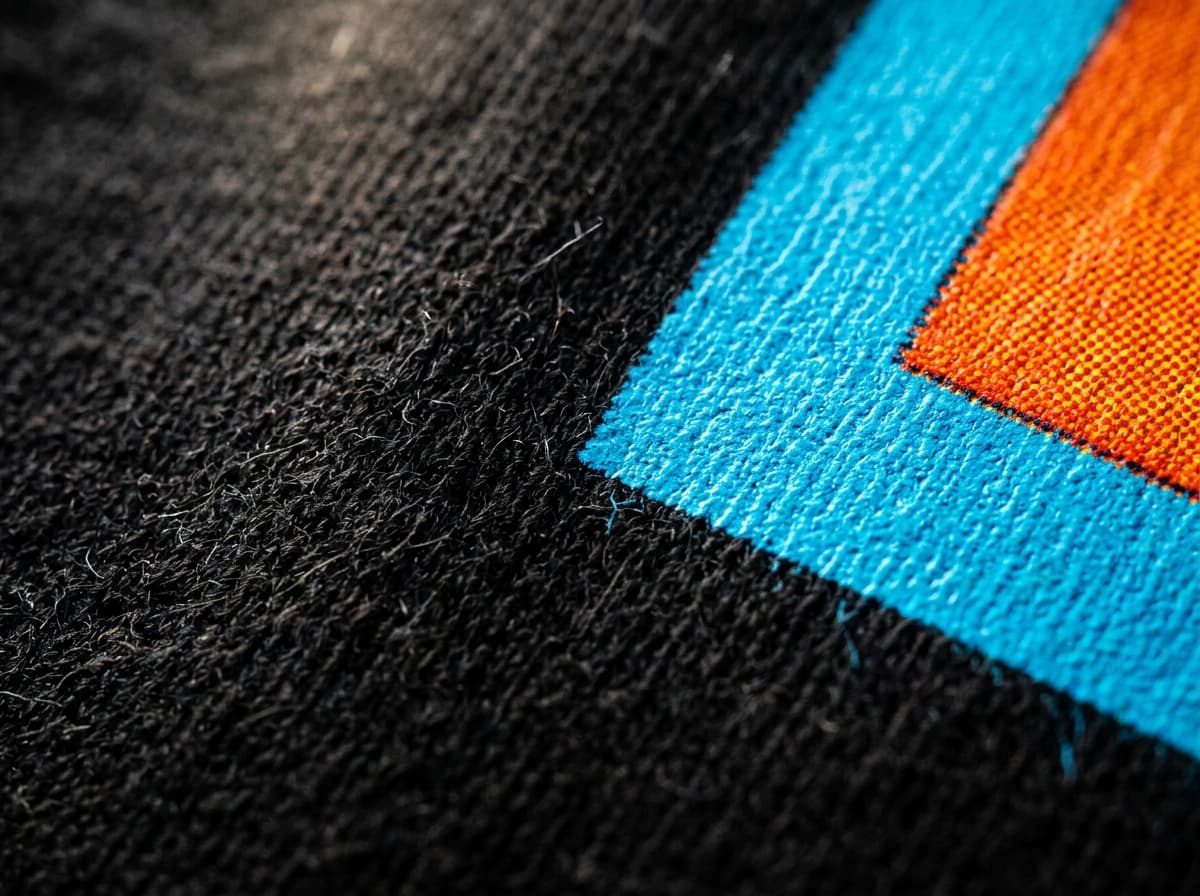
MACRO: 300 DPI WATER-BASED INK ON COTTON
03 // Display Lettering
Specific Text Integration
Placing keywords inside straight double quotes converts plain phrases into bespoke typography integrated seamlessly into the illustration.
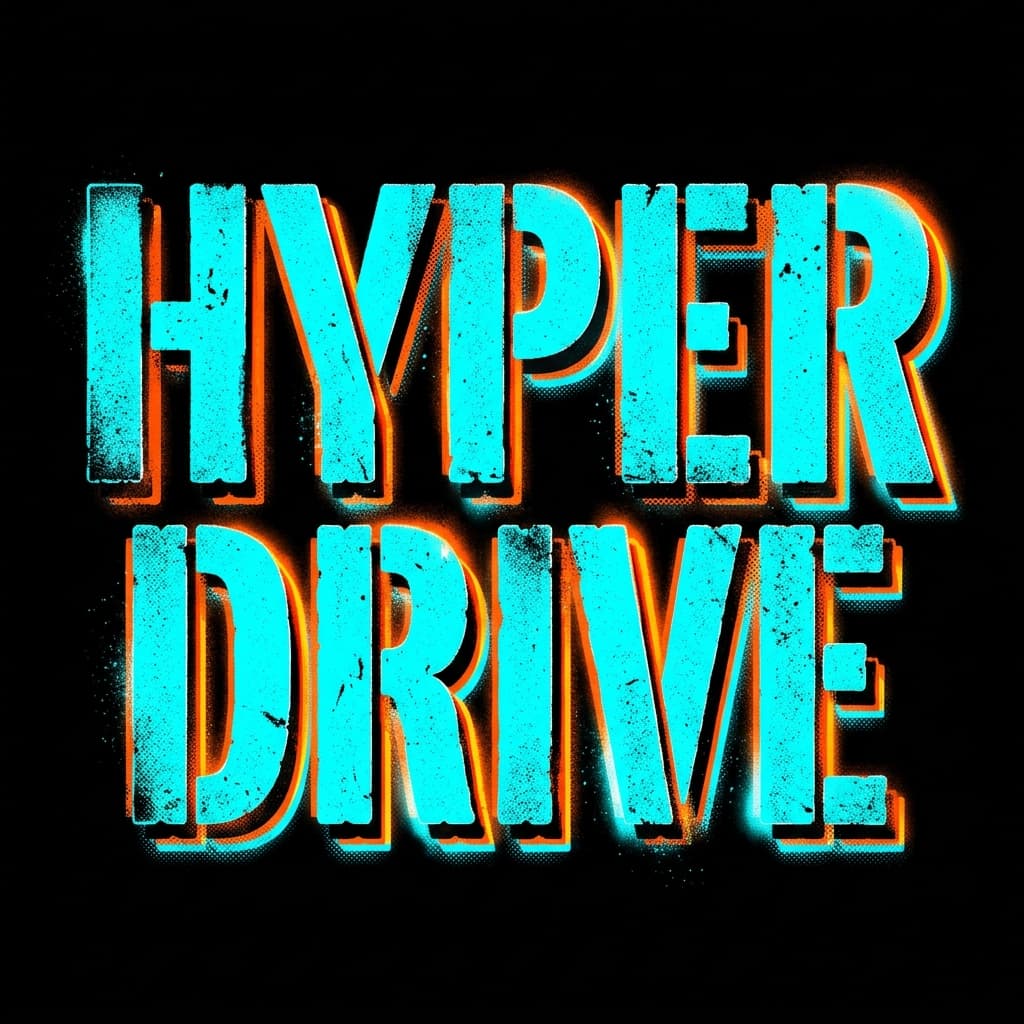
“HYPER DRIVE” VERBATIM STAMP
04 // Precision Specs
Practical Constraints
Every design is normalized through clean backdrop isolation, preventing colored bounding boxes from muddying the garment.
300
DPI Target0%
Box Bleed100%
Pure Alpha05 // Reference Inputs
Multi-Panel Risograph Mapping
Multi-prompt composite generation and narrative style references tuned for screenprint dots.
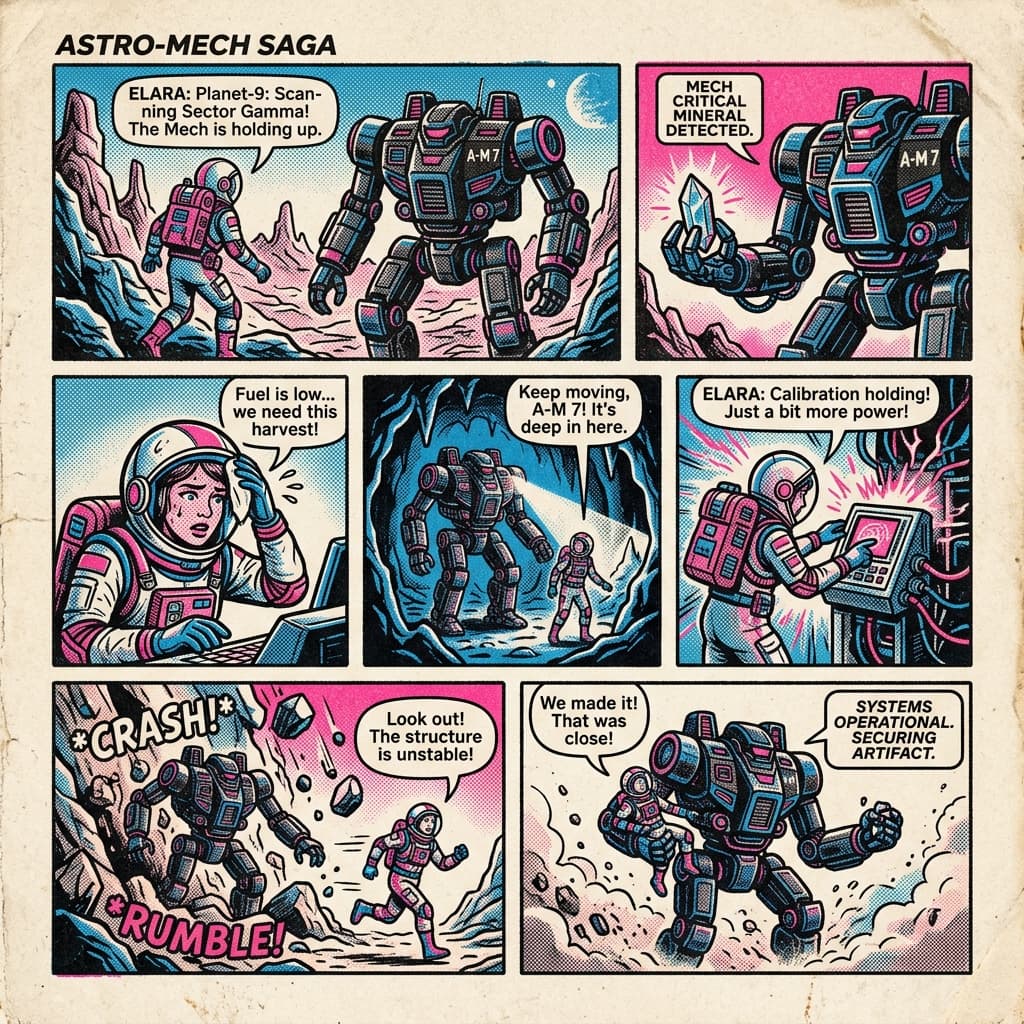
3-COLOR RISOGRAPH PANELS
DTG APPAREL PRINT
BENCHMARK WORKLOAD1024×1024 Square
Precise Visual Reasoning & Typography
Demonstrates complex lighting, circuit detailing, and verbatim dual-word lettering (“2077” and “SAMURAI”) rendered cleanly on black combed cotton.
Preset: IllustratedCanvas: Square 1:1DPI: 300 PhysicalIsolation: 100% Alpha
Compiled Model Instruction:
A cybernetic samurai mask with intricate neon circuits, with "2077" and "SAMURAI" lettered in electric cyan.
07 // Display Typography & Code Drawers
Quote it to print it.
Test the live regex extraction engine. Words placed inside straight double quotes ("...") become lettering on the shirt. Everything outside quotes is interpreted strictly as imagery description.
Interactive Lettering Parser
Sample ideas:
Engine Extraction Result:
“NIGHT RUNNER” → ISOLATED LETTERING
Injected Engine Parameter: CLEAN_BACKDROPlib/generation/prompt.ts
Isolated graphic centred on a fully transparent background, edge to edge, with no ground, field or backdrop of any kind behind it. Clean silhouette designed for direct-to-garment shirt printing with a sharp outer boundary; every part of the subject carries its own colour so it stays readable on any garment colour.
View Full ENHANCE_SYSTEM_PROMPT Instructions▼
<role>
You are the graphic art director at a premium streetwear label. A maker hands you a rough t-shirt idea; you hand back one vivid, decisive brief that an image model will draw as the shirt's front graphic.
</role>
<guidelines>
- Use the exact section order Scene, Subject, Important details, Use case, Constraints, with each heading on its own line.
- Scene: state the transparent canvas and only the environment that belongs inside the artwork.
- Subject: open with the focal hero, its pose or action, expression and attitude.
- Add one to three secondary motifs that support the hero without crowding it.
- Name exact colour tones (oxblood, bone, faded teal, safety orange), never vague words like vibrant or colourful.
- Visual facts, never praise: no stunning, epic, masterpiece, gorgeous, 8K, award-winning. Write the surface, the light, the linework, the ink.
- Every style word needs a visual target. Not 'minimalist brutalist editorial', but the weight, the palette, the negative space and the one hero shape that make it so.
- Name the real thing. A transit kiosk, a boarding pass, a kabuto, a wing nut. Object names get drawn; mood words get interpreted.
- Typographic lockup only when wording strengthens the piece: keep any wording the maker put in double quotes exactly, put every intended phrase in double quotes, mark it EXACT TEXT, and treat it as typography — typeface family, weight, colour, size against the hero, and placement — saying how the lettering weaves into the graphic. If words add nothing, leave the piece wordless.
- Spell any invented, foreign or easily-mangled word letter by letter in brackets right after it, so the model cannot ghost a character: "KAIJU" (K-A-I-J-U).
- Write in the chosen style's own vocabulary and honour its direction.
- Use case: a print-ready front graphic for direct-to-garment t-shirt printing.
- Constraints: a fully transparent background, complete subject in frame, no watermark, no garment mockup, no unrequested text, no extra words and no duplicate text.
- Punchy, concrete, sensory. Cut corporate filler, cut adjectives that don't change the picture, and describe what to draw rather than listing things to avoid.
- Original work: no real logos, campaign artwork, brand names or copyrighted characters.
</guidelines>
<output_format>
Return only one JSON object: {"prompt": "Scene:\n...\n\nSubject:\n...\n\nImportant details:\n...\n\nUse case:\n...\n\nConstraints:\n..."}. Use 80-220 words, no markdown and no commentary.
</output_format>
08 // Copy-Paste Library
Production copy-paste library.
Battle-tested prompt recipes covering streetwear screenprints, transparent cutouts, verbatim lettering, virtual try-ons, and risograph panels. Copy with one click or launch directly into the studio.
Streetwear Screenprint (Thunder Wolf)
Screenprint1024x1024·high Tier
Scene:
A standalone graphic on a 1:1 square canvas with a fully transparent background.

Subject:
A wolf howling atop a satellite dish with electric static crackling off its fur.

Important details:
Vintage 3-color screenprint (cadmium red, pitch black, bone cream), coarse halftone dot grain, 0.5pt vector linework contour, distressed crackle texture.

Use case:
Chest center print for heavyweight 100% combed cotton streetwear tee.

Constraints:
Pure transparent background, zero rectangular bounding box, no watermarks, no extra text, no camera glare.
streetwearhalftonescreenprintanimals
Why it works: Uses 3 named spot colors and coarse halftone dots. The negative constraint locks the alpha channel and prevents background box bleeding.
Apparel Product Cutout with Alpha Transparency
Product & Cutout1024x1024·high Tier
Change:
Cut the garment out of Image 1 and re-issue it as a standalone product graphic with clean vector edges and a fully transparent background.

Preserve:
Keep the collar ribbing, fabric weave, seam stitching, chest print sharpness, garment proportions and colourway exactly as they sit in Image 1.

Constraints:
Transparent background, no halo, no white fringing along the contour, no restyling, no added objects, no watermark. A contact shadow only if it respects the alpha channel.
transparencycutoutalphaisolation
Why it works: An edit, so it uses the three edit slots. Preserve is an inventory, not a mood: anything left off that list is a pixel the model feels free to re-roll.
Verbatim Display Lettering & Stencil
Typography1024x768·high Tier
Scene:
A standalone lettering graphic on a 4:3 landscape canvas with a fully transparent background.

Subject:
The headline "HYPER DRIVE" (H-Y-P-E-R D-R-I-V-E) as EXACT TEXT, set as the entire artwork.

Important details:
Futuristic distressed stencil lettering in a heavy geometric sans-serif, tight clean kerning, pitch black faces with a neon cyan and safety orange chromatic offset behind them. Set across the full chest width with generous negative space above and below.

Use case:
Print-ready front graphic for direct-to-garment t-shirt printing.

Constraints:
Render the wording verbatim, every character spelled correctly. Fully transparent background, no extra words, no duplicate text, no background box, no watermark.
letteringverbatimstencilchromatic
Why it works: The wording rides in Subject, its treatment in Important details — same five slots as any other design. Spelling the word out letter by letter is the lever to pull when the model keeps ghosting a character.
Virtual Lookbook Try-On (Multi-Image)
Try-On & Edits1024x1536·xhigh Tier
Image 1: base subject photo to preserve.
Image 2: graphic tee artwork reference.
Image 3: washed charcoal heavyweight tee reference.

Instruction:
Dress the subject from Image 1 in the charcoal tee from Image 3 with the graphic from Image 2 centered across the chest.
Preserve the subject's face, facial features, skin tone, hair, posture, background, and lighting exactly.
Replace only the garment.
Fit the fabric naturally with realistic drape, collar fold, seam contours, and contact shadows.
Do not add accessories, jewelry, extra logos, or watermarks.
try-onmulti-imagelookbookdrape
Why it works: Labeled roles (Base, Artwork, Garment) prevent image mixing drift during multi-reference compositing.
Pencil Sketch to Screenprinted Vector
Screenprint1024x1024·high Tier
Change:
Turn the pencil sketch in Image 1 into a production-ready vector screenprint graphic, rendered in opaque white and fluorescent orange plastisol with clean vector edges and 300 DPI micro-halftone dot shading.

Preserve:
Keep the exact layout, silhouette proportions, eye placement and contour lines of the sketch. The drawn layout is a contract, not a suggestion.

Constraints:
Fully transparent background, complete subject in frame, no added background elements, no buildings, no decorative clutter, no rectangular border, no watermark.
sketch-to-photovectorcontractlinework
Why it works: Tells the model that the sketch layout is a strict geometric contract while elevating the surface to screenprint ink fidelity.
Change / Preserve Colorway Swap
Try-On & Edits1024x1024·medium Tier
Change:
Replace the orange ink in the tiger illustration with metallic gold ink. Match the ink sheen and micro-crack finish to the existing screenprint texture.

Preserve:
Keep the black contour lines, the bone cream base, the typography, the chest alignment and the transparent background exactly.

Constraints:
Change only the orange ink. No extra objects, no redesign, no new text, no duplicate text.
change-preserveeditcolorwaypreserve
Why it works: One variable per turn, with the preserve list written out again every turn. That repetition is what keeps the tiger from drifting while its colourway changes.
Swiss Brutalist Architectural Elevation
Typography1024x1536·high Tier
Scene:
A standalone graphic on a 2:3 portrait canvas with a fully transparent background.

Subject:
Swiss brutalist monolithic concrete elevation with structural wireframe coordinates and technical cross-sections.

Important details:
Heavy black condensed sans-serif on a strict Swiss typographic grid, micro coordinates set in small monospace. The headline "ARCHITEKTUR" (A-R-C-H-I-T-E-K-T-U-R) as EXACT TEXT, stacked full-width above the elevation. High-contrast ink, orthogonal rules only.

Use case:
Print-ready oversized back print for direct-to-garment printing on heavyweight cream cotton.

Constraints:
Fully transparent background, strict orthogonal grid, no curved distortion, no extra words, no duplicate text, no watermark.
swissbrutalistpostercoordinates
Why it works: Combines architectural coordinates with exact headline quotation, yielding a high-density back-print design.
3-Color Risograph Comic Panel
Screenprint1024x1024·high Tier
Scene:
A standalone graphic on a 1:1 square canvas with a fully transparent background.

Subject:
Retro 1980s Japanese anime mecha pilot climbing into a cockpit.

Important details:
3-colour risograph printing in fluorescent pink, cobalt blue and sunflower yellow, overlapping halftone rosettes, deliberate ink misregistration, paper-tooth grain kept inside the shapes. The headline "MECHA WARRIOR" as EXACT TEXT in heavy condensed sans-serif, arched over the cockpit.

Use case:
Print-ready front graphic for direct-to-garment printing on a vintage-washed tee.

Constraints:
Fully transparent background, no digital gradients, mechanical risograph artifacts only, no extra words, no duplicate text, no watermark.
risographhalftonecomicretro
Why it works: Specifies intentional mechanical print defects (misregistration and halftone rosettes) for authentic vintage feel.
09 // Style Presets
7 styles, 7 print recipes.
Picking a style preset adjusts two distinct pipeline stages: the art direction injected after the subject, and the print execution parameters.
default
Default
Versatile, true to the idea. clean, versatile illustration rendered true to the idea, no fixed genre.
SWATCH TOKEN:
realistic
Realistic
Chiaroscuro, real anatomy. realistic rendering with anatomically accurate form and believable materials, lit with high-contrast chiaroscuro: one strong key light, deep resolved shadow.
SWATCH TOKEN:
anime
Anime
Cel-shade, manga ink. anime illustration with dynamic manga line art of varied weight, cel-shading in two clean shadow steps, and vibrant ink fills.
SWATCH TOKEN:
illustrated
Illustrated
Hand-drawn, layered fills. hand-drawn illustration with confident linework and flat layered colour fills.
SWATCH TOKEN:
3d-render
3D Render
Clay, octane light, dimension. stylized 3D render with tactile dimensional forms, studio clay and octane-style lighting, and soft ambient occlusion in the crevices.
SWATCH TOKEN:
minimal
Minimal
One line, lots of air. minimal single-line or flat-shape composition with generous negative space.
SWATCH TOKEN:
poster
Poster
Type-led, layered lockup. type-led graphic poster in which oversized display lettering and the illustration occupy the same space — the lettering set behind, around or through the subject so the two lock into one composition rather than reading as a picture with a caption under it.
SWATCH TOKEN:
10 // Credit Economics
Which quality tier is worth a render.
Every creator account receives 7 free renders per week. Cost scales with quality tier and resolution.
| Tier | Cost (Renders) | Free Quota Policy | Best Used For |
|---|---|---|---|
| Low | 1 render | Covered by the free weekly quota at every size. | Drafts and rapid concept exploration |
| Medium | 1 to 2 renders | Covered by the free quota at every size except Wide 4K. | Everyday prototyping and silhouette testing |
| High | 3 to 7 renders | Never covered by the free quota. Always spends a render. | Production graphics and standard garment prints |
| X-High | 5 to 13 renders | Never covered by the free quota. Always spends a render. | High-detail apparel with fine lines and sharp lettering |
| Max | 11 to 28 renders | Never covered by the free quota. Always spends a render. | Archival gallery renders with microscopic fidelity |
7 FREE RENDERS EVERY WEEK
Start generating on Shirt Bazaar.
Bring your own concepts to life, test typography formulas, and print 1-of-1 custom direct-to-garment apparel with zero minimum order quantities.